Desktop app
TranscribeCppSharp.UI is an Avalonia app on .NET 10 that drives the same wrapper and the same native library as the command-line tool. It adds no transcription logic of its own, so every limit documented on the other pages — the thread-safety rule, the streaming abort, the missing CUDA runtime — applies to it unchanged.
Running it
Each release attaches a self-contained archive per platform — TranscribeCppSharp.UI-<version>-<rid>.zip for win-x64, linux-x64, linux-arm64, osx-arm64 and osx-x64. Unzip it and run the executable: it carries the .NET runtime and the matching native transcribe.cpp build, so no SDK is needed. It carries the project licence and the upstream component licences under licenses/. Three things it does not carry:
- No code signature. There is no installer and no notarization, so Windows SmartScreen and macOS Gatekeeper will warn or refuse on first launch.
- No
.appbundle on macOS. The archive is a bare executable (noInfo.plist), so Finder gives it no Dock name and Gatekeeper quarantines it like any unsigned download; clear it withxattr -dr com.apple.quarantine TranscribeCppSharp.UIif it refuses to run. - No
ffmpeg. The app still needs it onPATHfor any non-WAV input and for the microphone (Audio input).
To run from a clone instead, fetch the native libraries once and then start it:
dotnet run --project tools/FetchNative
dotnet run --project src/TranscribeCppSharp.UI
FetchNative is the same prerequisite the CLI has. The project copies the fetched native build into the app’s output directory on every build, which is deliberate: a front end that resolved an older libtranscribe would fail at run time rather than at build time, on whichever entry point happened to be missing.
The native library is what the app and the CLI share, so there is no per-app installation to keep in step. What is shared is the model cache as well: see Models below.
The window opens on Windows, macOS and Linux. It is resizable, scrolls vertically, and does not scroll horizontally — a horizontally scrollable panel would offer the grids an infinite width, and a DataGrid given infinite width gives its star-sized columns no width at all.
The five tabs
The pictures below are generated from the app itself by samples/UIScreenshot, which drives the real window with the real view models and takes the frame itself. Nothing is stubbed to suit a picture, and nothing is fabricated to fill one: what a tab shows on a fresh machine is what a tab shows here — no audio picked, nothing transcribed, nothing downloaded. What the machine decides is in the picture, so the Settings tab lists whatever devices it has, and the cache line counts whatever it has fetched. Regenerate them with:
dotnet run --project samples/UIScreenshot # writes into docs/assets/images
The pictures on this page were taken before the shared style layer described under Look and theme landed, so they show the previous colours, button weights and flat panels. The behaviour and the layout they document are unchanged.
Where the grid scrolls. The Models tab is the one tab not wrapped in the view’s ScrollViewer. That wrapper measures its child against infinite height, and a star row given infinite height resolves to its content — the grid came out 2408 px tall in a 720 px window, so it never scrolled internally and the whole page scrolled instead, taking the column headers off the top and leaving the detail pane four screens down. Without it the grid takes the space that is left, scrolls inside itself with its header in place, and the detail pane appears by shrinking it.
And both star, not one. The grid and the detail pane are two * rows, so they split what the fixed rows leave rather than competing for it. The fixed rows measure 368 px — the banner carrying a caveat, the filter row and the sort row both wrapping, a summary, the buttons and a status line — so at the old 720 px window only 222 px were left: 111 px each, and zero for the grid once a row was selected and the pane took its fixed 250. That is a master-detail whose master disappears when you pick a row, which is what the test that asserts a floor now guards. The window opens at 880 px and will not shrink below 640 px, which is where the Models tab stops being usable.
What the three model pickers offer. Transcription, Streaming and Batch list only the aliases already on disk, so an entry means you can run it now — with a fresh cache the list is empty and the button that starts a run is disabled. Streaming narrows that further to the models that can stream — upstream’s declaration when nothing has been checked, this machine’s own answer once the model has been loaded — because a model that cannot stream has nothing to do on that tab. Under each picker sits a count and a Get more… button that switches to the Models tab, always visible rather than only once the list has run out: a picker with one entry does not tell you the other 71 exist. The list is re-read on every tab change, because downloads happen in Models while the pickers are built once when the window opens — without that, the guidance would point at a download that never appears.
Which entry is selected. A tab reselects the model it last ran, not the first alias alphabetically: the app records it in ui-settings.json beside the log (<cache>/../ui-settings.json) and reads it when the picker is built. Picking a model in the list and not running it is not a use and is not recorded. A model that has since been deleted, or that no longer passes the streaming filter, is ignored — the picker falls back to the first entry. With nothing recorded yet, or a settings file that cannot be read, the first alias is selected as before.
Transcription
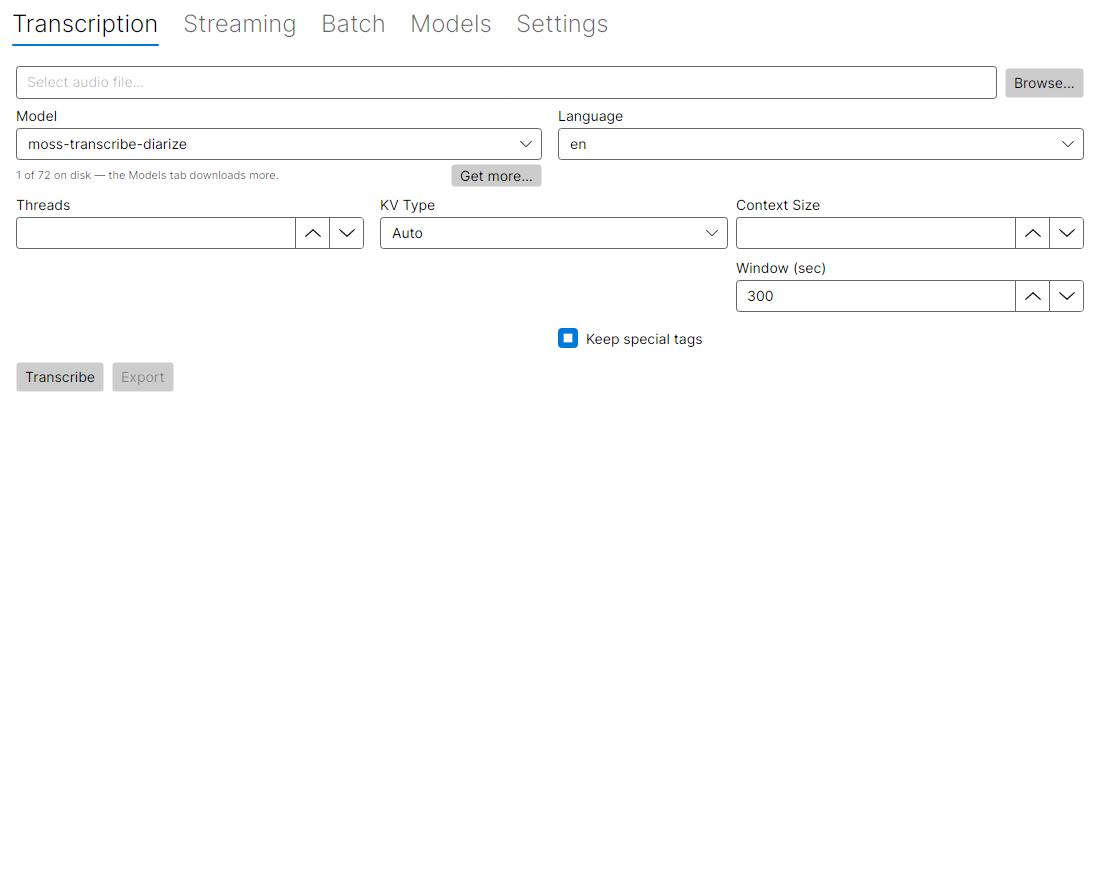
Pick a file, a model and the decoder settings, then run.
The tab runs the role the selected model serves (transcribe.cpp 0.4), and the line under the picker names it. An ASR model is transcribed as below; a diarization model (Sortformer) returns speaker turns; a language-identification model returns the ranked languages; a voice-activity model returns the speech segments. The result appears in the Text tab and, by role, in a Languages grid (ranked candidates) or a Speech grid (segments, in samples); a diarizer fills the Speakers tab. A language model also shows an Allowed languages field (comma-separated codes) to restrict the ranking. Decoder settings that only apply to ASR are hidden for the other roles.
A voice-activity model is scored one window at a time (Silero VAD is chunked-unbounded upstream), so a long file does not have to fit in memory; the Window setting is that window. Each window is scored independently, so the segment boundaries at a seam can differ slightly from a single pass — the speech found is the same. A diarizer is run whole — its speaker ids are per run, so splitting would renumber them at the seam.
A 16 kHz mono 16-bit WAV is read directly. Any other format (mp3, flac, ogg, m4a) is decoded with ffmpeg, which has to be installed and on PATH — see Audio input.
| Setting | Default | Notes |
|---|---|---|
| Model | the CLI’s default alias | Downloaded on first use and cached |
| Language | en, then whatever the model allows | Before the model is probed, the picker falls back to ten codes (en, fr, de, es, it, pt, ru, zh, ja, ko). Once a model has been probed the list is what it declares, with auto added when it reports language detection, and auto means no language is passed at all so the model decides for itself. If the current choice is not in the new list, the picker takes the first entry instead of keeping an unavailable one |
| Threads | library default | Left empty on purpose. This is not a benchmarked recommendation — raising it past the core count usually makes it slower |
| KV type | Auto | F32 keeps the most precision and the most memory; F16 halves the cache |
| Context size | model maximum | Lower uses less memory; too low truncates long passages |
| Window | 300 s | Longest audio passed in one call. Longer audio is split into windows overlapping by 1 s and merged; see Long audio and diarization |
| Keep special tags | off | Off removes markers such as <|notimestamps|> from the text |
Three settings appear only for models that have them: the Whisper initial prompt and temperature, the task and the target-language picker, and the speculative-decoding draft count. They are hidden based on what the model reports, not on what its name suggests — see Asking the model below.
A fourth, diarization, appears only for a model that transcribes and can attribute speakers: it is passed as WithDiarize and the choices are model default, off and on. A model that only diarizes is not offered it — that model runs the DIARIZE role, where there is nothing to ask — and the run button is named for what the model does (Transcribe, Diarize, Identify language or Detect speech) so the role is visible before the run rather than only in the result. See Long audio and diarization.
For a model that transcribes and cannot diarize itself, a Diarizer picker appears instead: it offers the downloaded models that serve only the DIARIZE role (Sortformer). With one chosen, the tab runs the transcriber, then the diarizer over the same audio, and gives each segment the speaker whose turn overlaps it most. The two run one after the other, so only one model is in memory at a time. The join is this app’s, not the library’s, and it is heuristic — see Combining a diarizer with a transcriber.
The result is shown four ways: as text, as segments with timings, as words with timings, and as speaker-attributed segments. Export writes .txt, .vtt or .json, picked by the extension you type; the formats themselves are the same as the CLI’s. The Text tab’s text is selectable, so a passage can be copied out by hand instead of exporting the whole result.
Streaming
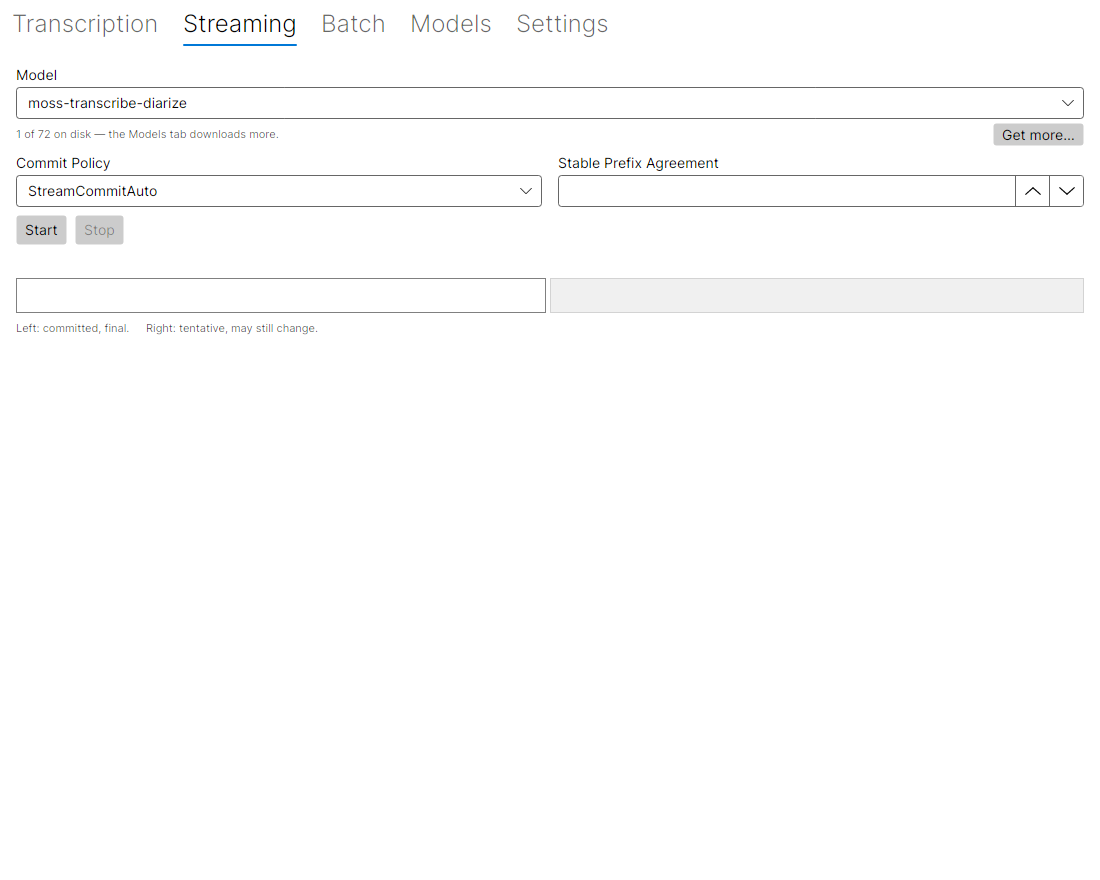
Transcribes the microphone live, at 16 kHz mono 16-bit PCM. The audio is captured by ffmpeg, which must be on PATH — the same requirement as decoding a non-WAV file. It opens the system input on Linux (PulseAudio) and macOS (AVFoundation); Windows DirectShow has no default input, so set TRANSCRIBE_MIC_DEVICE to a device name (ffmpeg -f dshow -list_devices true -i "" lists them). TRANSCRIBE_MIC_FORMAT and TRANSCRIBE_MIC_DEVICE override the default on every platform.
The two text areas are the point of the layout. Committed text, on the left, is final. Tentative text, on the right and in italics, is what the model would say so far and may still revise. Which side text lands on depends on the commit policy: Auto lets the model decide, Finalize commits only when the model calls a segment final (later but steadier text), and Stable Prefix commits once a prefix has stopped changing (sooner text that can still be revised). The Stable Prefix agreement count is how many unchanged passes a prefix needs before it is committed.
Both text areas are selectable: drag for a range, double-click for a word, and the right-click Copy item or Ctrl+C copies the selection. Clear, beside Stop, empties both. During a run it does not reset the native stream — committed text is append-only — so it hides what was shown up to the click and displays what comes after it; the model keeps the audio context it has already captured. After a run, Clear just empties the two panels.
Family extensions appear only for a model that both streams and has the matching extension builder: a decode interval for Moonshine, buffered-streaming context and attention for Parakeet, delay tokens and a decode interval for Voxtral.
An empty extension field is not “off”: the extension is left off the run entirely, so the model’s own default applies — which is also what the native default, the -1 sentinel the *_ext_init functions set, means. Each field shows (model default) as its placeholder, Reset clears them all (enabled only when something is set), and the tooltips say what each knob does and what the default is. For Parakeet buffered context that default is a tuple from the model’s training menu — 5600 / 1040 / 1040 ms for parakeet-unified-en-0.6b — and a positive value must be an exact multiple of the 80 ms encoder frame. For Voxtral the delay defaults to 6 tokens, and only 1 to 15 or 30 is accepted. The values the library actually initializes are exposed by the wrapper’s builders and pinned by a test, rather than written into this page.
Utterance (s) closes the native stream and starts a new one on the same model after that many seconds of audio, so the memory the stream holds does not grow with how long you stream. The streaming API works on one utterance at a time and keeps that utterance’s working set, which for a model that re-decodes from the start on every feed grows with its audio — measured at roughly 2.8 MiB per second of audio. The committed text of each closed utterance is kept and prepended to the next, so nothing already transcribed disappears, but the model loses its audio context across the boundary and a word split across it can be broken. The default is 30 s; 0 keeps one utterance for the whole session, which is the behaviour before this field existed. The numbers, the controls behind them, and what is still unverified are on Streaming benchmarks.
Start is enabled only for a model that can stream. The picker offers only the downloaded models upstream records as able to stream — the same pinned-catalog source the Models tab’s capability filter reads. MOSS, the default model, is not one of them: it declares streaming.supported = false, the native library refuses StreamBegin with ErrNotImplemented, and the two agree. With only MOSS on disk the picker is empty and the line under it points at the Models tab rather than offering a run that fails. A model upstream says nothing about is still offered — unknown is not a no — and Start then falls back to upstream’s record until this machine has loaded the model and answered for itself.
Upstream and this machine can disagree, and the machine wins. A Sortformer diarizer is recorded upstream as streaming.supported = true, but that is its streaming diarization API; this tab runs the ASR stream, and the loaded model reports it has none. Rather than keep such a model in the picker under a “does not support streaming” warning, the tab leaves it out once it has been checked — the same way it leaves out a model upstream itself records as unable to stream — and selects the next streaming model. This is why the tab can offer a model whose name says “streaming” only after it has actually loaded it and confirmed the ASR stream is there.
Read Real-time streaming and Streaming benchmarks before relying on this tab. In short, and unchanged by the GUI: the model default does not keep up with live audio on the CPU backend, setting a decode interval or the commit policy is not optional for a live pipeline, and on the CPU backend a stream of roughly 88 s of audio aborts the process inside ggml. That abort is native, so no try/catch in the app intercepts it and no status line will ever report it. It is upstream behaviour in transcribe.cpp, not a bug in this app. Utterance (s), above, is the one mitigation the tab offers: the default 30 s closes the stream before a single utterance reaches the abort or grows the memory further, at a cost to the model’s context across the boundary.
Batch
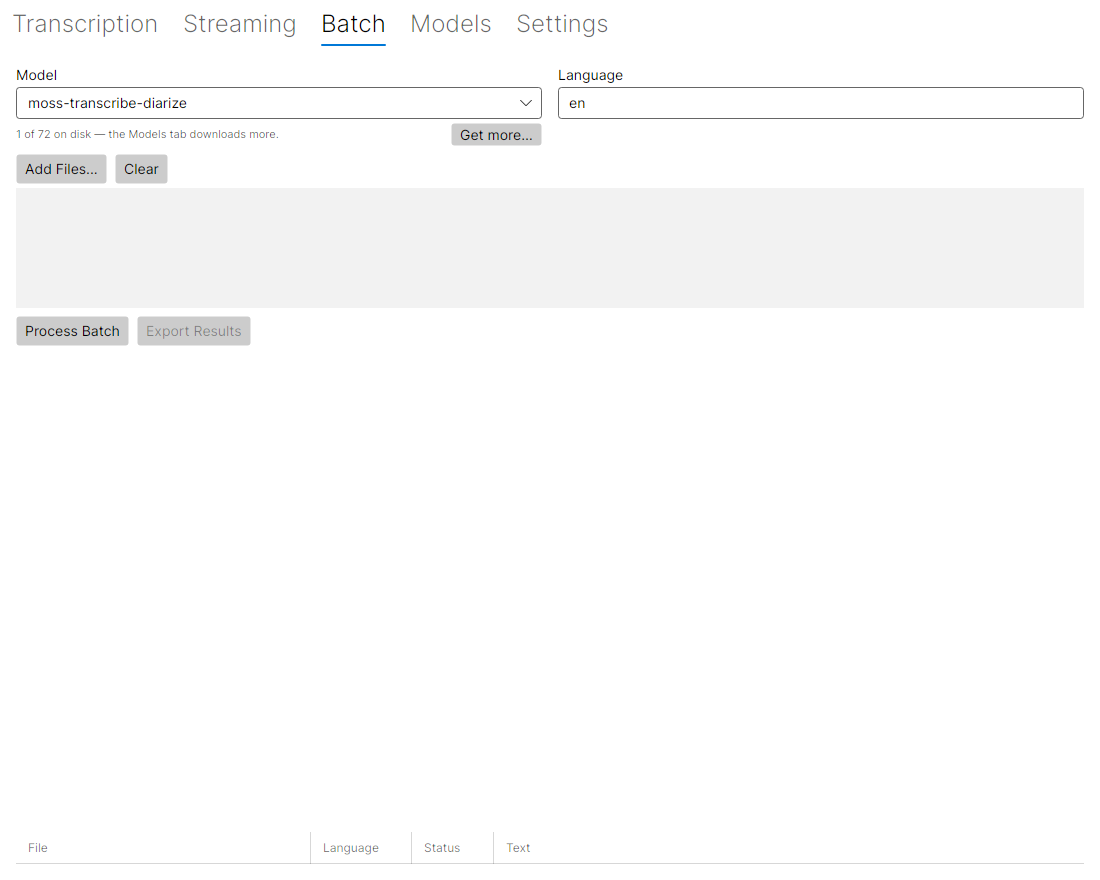
Queue several files and run them one after another against a single loaded model.
Sequential is not an oversight: the library is not thread-safe, so one model at a time is what is safe. Results land in a grid with the detected language, the status and the text, and export as .txt or .json.
Models
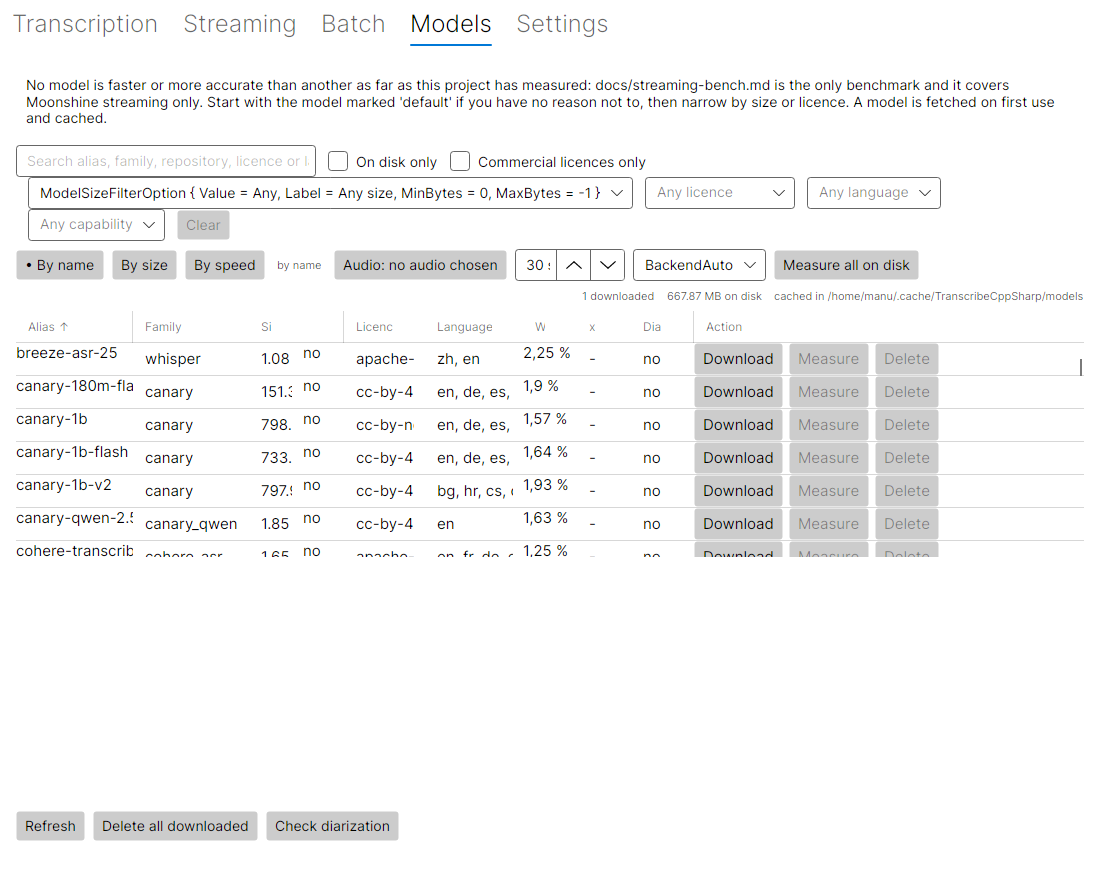
The 76 curated aliases from the same manifest the CLI resolves against. All of them together come to 58 GiB, which is why the grid starts empty of weights and shows what is on disk.
- Filters. Free text over the alias, the family read from the repository name, the repository and the licence; plus on disk only, commercial licences only, a size filter, and a licence filter. The commercial filter is a text test on the SPDX identifier in the manifest, so read the licence itself before relying on it —
othermeans the manifest names no standard licence. - Per row: download, measure, delete. A download is verified against the sha256 in the manifest before it is cached, at the pinned revision.
- The default model is marked. The alias the CLI uses when no
--modelis given is shown asdefaultin the Alias column. It is a mark of which alias a command ends up using, not a claim about quality or speed. - Sort by clicking a header. Eight of the nine data columns order the grid — Alias, Family, Size, On disk, Licence, Languages, x realtime and Diarization — and the arrow on the header says which way. Clicking again reverses it. Each orders by the value it shows, so what you see in the column is what the order follows. The three sort buttons above the grid set the same state, so both routes move the same arrow. The one data column that declines is WER, deliberately: its 74 figures come from three metrics (67 WER, 6 CER, 1 DER), two datasets and eight languages, so an order over them would rank numbers that do not measure the same thing. Its tooltip says so rather than leaving a silent refusal.
Actionis not data — it holds buttons. - Filter by language. The picker beside the licence and size filters narrows the grid to the models whose card declares a language — codes, as the cards state them. A model that declares nothing is hidden while a language is selected, because unknown is not the same as yes. The free-text search reaches the codes too, so typing one filters the same way, and Clear turns all of them off at once.
- Filter by capability. The picker beside the language filter lists every capability transcribe.cpp records —
streaming,diarize,translate,timestamps,lang_detect,batchingand the rest. The names are theirs, taken from their catalog rather than written here, so every choice has at least one model behind it; a model with no record is hidden while one is set, which is the rule the language filter applies too. It selects one at a time. For a model that both streams and diarizes — there are two:diar_streaming_sortformer_4spk-v2.1andmultitalker-parakeet-streaming-0.6b-v1— filter bystreamingand read the Diarization column, which now answers for ten models rather than waiting for a download. - The detail pane quotes upstream. Below the grid, the selected model shows what
transcribe.cppitself records: the parameter count and the checkpoint it was converted from, every quantization they publish (with the note that only the one this row pins has been downloaded and verified here), their capability flags — with unverified upstream when they mark one supported without claiming to have checked it — and their headline accuracy figure, named as their measurement on their benchmark. The family column comes from the same source, so it readswhisperrather than a name guessed from the repository. The data is pinned at the tag this project binds; seecatalog/for how it was fetched and what it must not be used for. With no model selected, the pane carries a line saying to pick one rather than an empty half of the window. - Licence and languages come from the model card. The grid’s Languages column shows the first four codes and counts the rest, because some models declare 99; the detail pane below carries the whole list and names where it came from. Every entry states its languages except the voice-activity model (
silero-vad-v6.2), which has none — the manifest is filled in bytools/UpdateModelManifest, whose--languages-onlymode readscardData.languageand rewrites nothing else, so adding the column cannot re-pin a revision or a checksum. - Diarization answers from whichever source can answer. A model that has been loaded on this machine reports for itself, and wins — including when the load fails, in which case the cell says
?rather than letting a catalog entry stand in for a result the machine could not produce. Until then the column reads what transcribe.cpp records (capabilities.diarize), which answers for all 76 models — foursupported, the rest not; the detail pane names the source and says unverified by them where they mark it supported without claiming to have checked it. Check diarization loads only the models whose answer could still change: the ones the catalog records as supported — the four it marksverified: false— and any it records nothing about. It skips the rest, whose answer the catalog already gives, and rows already checked this session, and says how many it skipped. It asks both the ASRdiarizefeature and the DIARIZE role, so a Sortformer — whose whole product is speaker turns — reads supported. See Long audio and diarization. - On disk is a yes or a no. The Size column beside it carries the download size and the line above the grid carries the total, so the per-row size was saying twice what the reader already had and costing the column its width. What the yes means — verified against the manifest’s sha256 — is in the detail pane, next to the path.
- A download shows on its own row. While a model is being fetched, its Download button reads “Downloading…” and a progress bar appears beside it in the Action column, and the status line names the model and the percentage. The bar at the bottom of the tab shows the same progress; the benchmark bar beside it appears only while a model is being timed, not during a download, so the two no longer overlap.
- Error rate is their figure. One number per model, from transcribe.cpp’s own measurement, for the quantization this project pins. Hover it for the metric, the dataset, the split, the language and their provenance flag — including engine build not recorded upstream, which several rows honestly carry. The header says WER because that is the majority of it, but 67 of the 74 figures are WER, six are CER and one is a DER, so read the tooltip rather than the column name when it matters. It is not a measurement of your audio, and this project publishes no accuracy figure of its own; the number is theirs.
- Measure times a model over an excerpt of audio you pick, because a timing is only meaningful for the audio it was taken on. One pass is discarded as warm-up and three are timed; the best is kept, since contention only ever makes a run slower. The backend is recorded with the result, because timings from different backends are not comparable. Results are held in memory for the session and are not written to disk.
Sort by speed orders the grid by what you measured here, and models you have not measured cannot be placed in a speed order, so they stay at the bottom in name order.
This app does not rank models by accuracy, and the WER column is not a ranking. This project publishes no accuracy comparison between them, so there is none to show. Measure tells you how fast a model ran on your audio and nothing else. Streaming benchmarks is the only benchmark the project has, and it covers Moonshine streaming only.
Settings
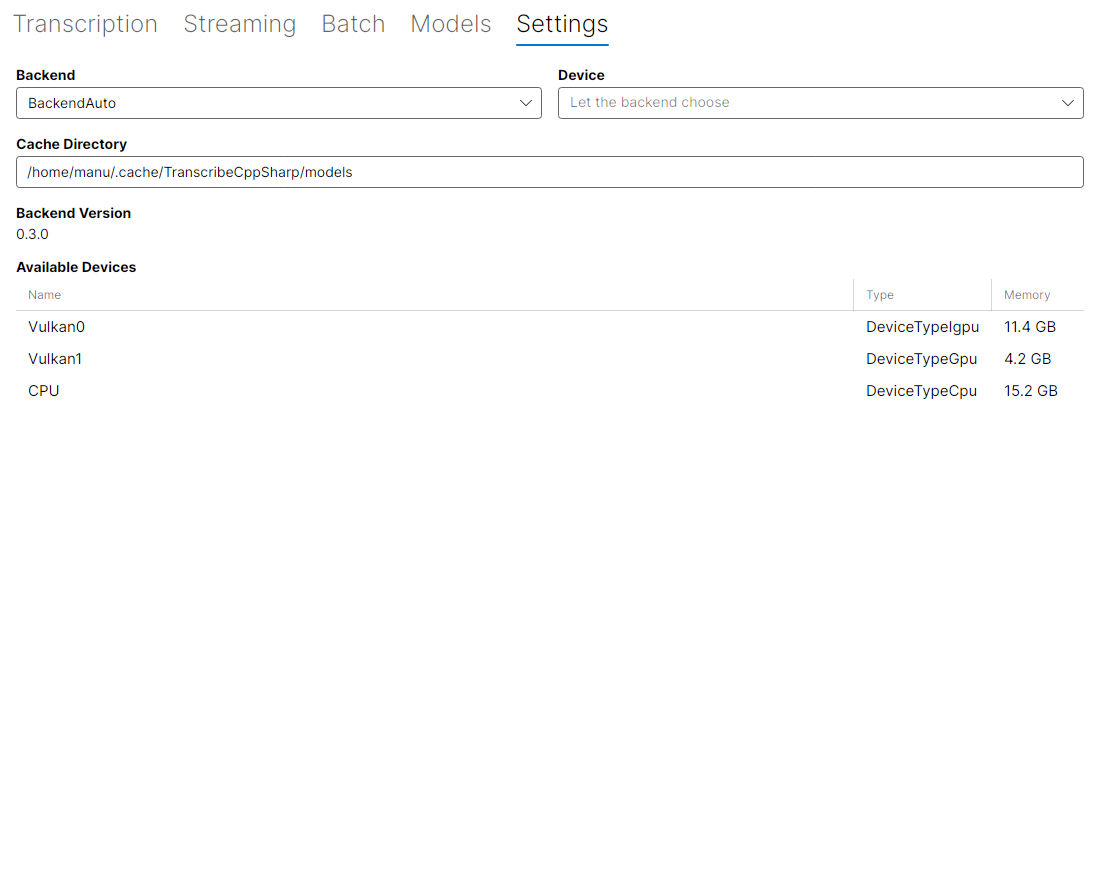
Backend and device selection, the cache directory, the version of the native library, and the compute devices this build and this machine can see.
Auto is the default backend and its behaviour is the one described on Compute: the GPU is used when one initializes, and a forced backend fails rather than silently falling back. Pinning a device is stricter still — it never falls back to another device, so a model that will not fit there fails instead of quietly running elsewhere. The backend and device picked here are what the three transcription tabs use.
Asking the model
Everywhere a model is chosen, the app loads it once and asks it what it can do, rather than guessing from the alias — a Whisper-derived model whose name does not say “whisper” would be guessed wrong. Model.Supports needs the weights loaded and the manifest declares no capabilities, so this is the authoritative answer, and it is why options appear as soon as a model is on disk.
Two consequences worth knowing:
- A model that is not downloaded keeps every option visible, and the line under the picker says why. Hiding an option on a guess would hide one that would have worked.
- The probe loads on the CPU, so checking a model’s capabilities does not take the GPU away from a run already using it.
The language picker works the same way: ten codes stand in while nothing has been probed, and a probed model replaces that list with the languages it actually reports. The UI used to offer languages a model could not handle, and no way to ask for auto-detection at all.
Capabilities are cached per alias for the session, in a single cache shared by the tabs. The transcription and streaming tabs each read the default model when they are built, so without the sharing they loaded the same weights twice at once — two copies of the file in memory, and on a machine already short of RAM that was enough for the OOM killer. A caller that asks while a load is in progress waits for it instead of starting another.
When something fails
A failure the app catches is shown as a line of status text and also appended, in full — exception type, message, inner exceptions and stack trace — to <cache>/../logs/ui.log, beside the models directory the Settings tab already names. The status line is not selectable, so the file is where to look for what actually happened; when a message reports a failure it also names that path. The file is appended to and never rotated. Not every failure in the app goes through it — only the ones the view models catch and report. One that deliberately does not: a model deleted while the Streaming tab was reading its capabilities leaves the picker without a log entry, because a file the reader has already removed is not a capability failure. A model that is present but cannot be loaded is logged as usual.
Look and theme
The window follows the operating system’s light or dark setting: it sets RequestedThemeVariant="Default" and pins no theme of its own. The colours it uses are defined once per variant, so changing the system theme changes the app with it rather than leaving a light panel on a dark window.
What the views share lives in two files under src/TranscribeCppSharp.UI/Styles:
Tokens.axamlholds the numbers and the semantic colours — a spacing scale, two corner radii, four font sizes, and brushes for helper text, cards, the tentative streaming panel and warnings. Each brush is defined for Light, Dark and Default, which is what makes the app theme-aware.Controls.axamlturns them into classes the views apply by name:sectionfor a heading,labelfor a field caption,hintfor muted helper text,dangerfor a warning,cardandtentativefor panels, andaccentfor the one action that starts work on a tab.
It is presentation only. No token or class changes what the app does, and none carries a claim about it.
What the app does not do
- It ships unsigned. Each release attaches a self-contained archive per platform, but nothing is code-signed and there is no installer, as above.
- It is not a second transcription implementation. It is a front end over the wrapper, so it has exactly the wrapper’s behaviour and the wrapper’s limits. Where the app and the documentation disagree, the documentation is describing the code and the app is the thing that is wrong.
- It cannot attribute speakers while streaming.
transcribe_stream_paramshas nodiarizefield in transcribe.cpp v0.4.0, so the streaming API cannot request it (Diarization). The Speakers tab belongs to the Transcription tab, which runs offline. - It does not time models for you against published numbers.
Measureruns on your machine, over your audio. - No accuracy comparison is ours. The grid quotes upstream’s error rate per model, which is their measurement on their benchmark and not a comparison this project made — let alone one you could sort, since those figures come from three metrics and two datasets. What this project’s own judgement adds is filtering by licence, family, size, language and what is on disk.
How it is tested
Headless Avalonia tests in tests/TranscribeCppSharp.UI.Tests, run by the same ./scripts/run-integration-tests.sh as everything else, on all three CI platforms. They build the real App on Avalonia’s headless backend, so the views load with the styles they get on screen.
What they cover is worth stating, because it is narrow: the automation ids on all five views, which view models hide options a model does not support, the defaults, and the catalogue item’s display states. The bindings inside a DataTemplate are verified by realizing the rows and reading the values back — a property with no binding fails silently, which is how the default-model mark stayed missing from the grid while its property existed.
Two things they do not cover. The accessible names set in the XAML are not asserted by any test — only the ids are, and a name is not an id. And no test drives the window interactively end to end, or asserts what the app looks like.
The pictures above are not a screenshot test either. They come from samples/UIScreenshot, which runs the real window through Avalonia’s headless platform and saves whatever it draws; it is a generator, run by hand, not a check that fails when a pixel moves. Nothing in CI compares them against anything, so a visual regression passes unnoticed — the automation ids are what CI actually pins down.