TranscribeCppSharp
A transcribe command-line tool, a desktop app and .NET bindings for transcribe.cpp (speech-to-text): get a transcript from a shell with no code, from a window, or load GGUF models from C#.
This project is a packaging and binding effort only — the native library is developed by the transcribe.cpp authors and is not my work. See Attribution.
Transcribe from a shell
dotnet tool install -g TranscribeCppSharp.Cli
transcribe jfk.wav --model whisper-tiny
No project file, no C#, and no model to fetch by hand. The model is downloaded from HuggingFace on first use (42.16 MB for that alias), verified by sha256 and cached, so later runs are offline. It runs on the GPU when one initializes.
Two things that is not, so the claim stays honest. The tool is a .NET tool, so it needs the .NET 10 runtime — just not a compiler, a project or any code. And the native runtime is embedded in the package, so nothing native is downloaded or built at first run. An NVIDIA GPU is the exception: CUDA needs a native build of your own, which is out of scope for this packaging layer.
Every option, the export formats and what the tool does not do: Command-line tool.
Or use the desktop app
TranscribeCppSharp.UI is an Avalonia GUI over the same wrapper: five tabs for transcribing a file, streaming the microphone, a batch, the model catalogue and the compute settings. Each release attaches a self-contained archive per platform (no NuGet package); you can also run it from a clone:
dotnet run --project tools/FetchNative            # once: the native library the app loads
dotnet run --project src/TranscribeCppSharp.UI
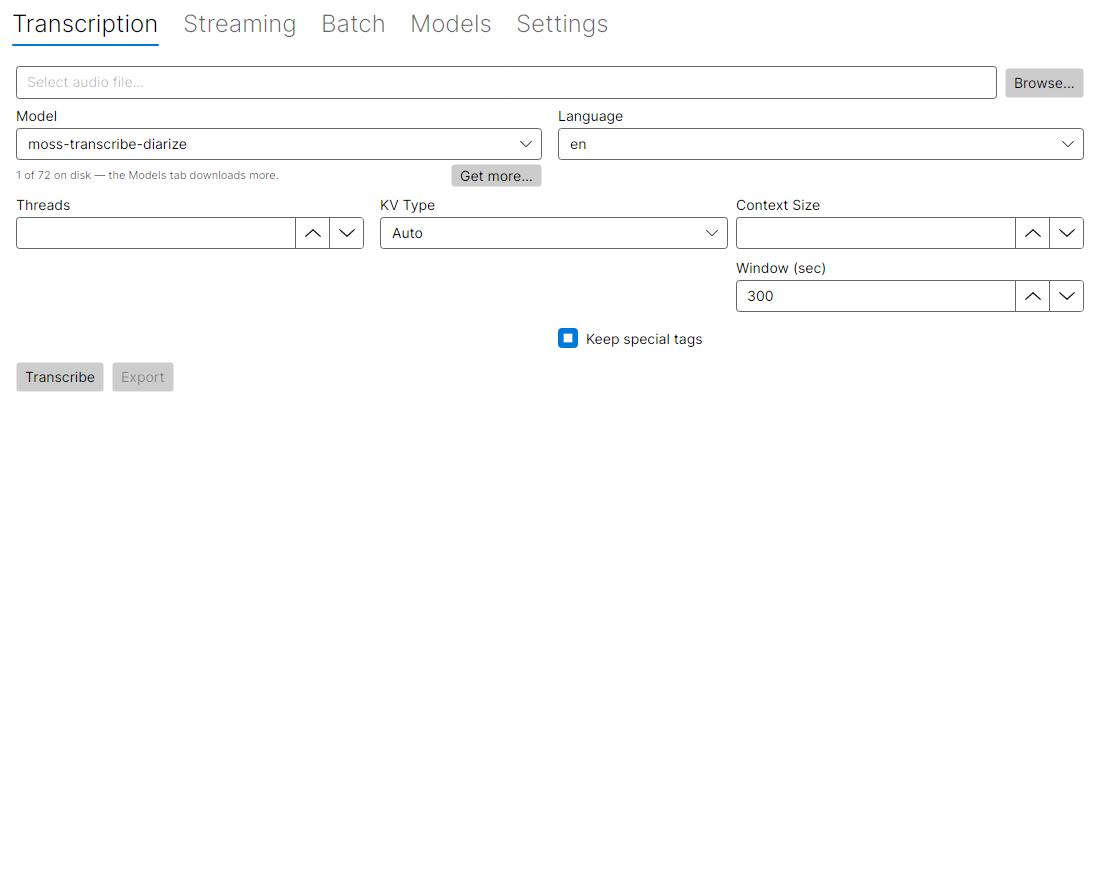
The Transcription tab, with nothing picked and nothing run. The picture is generated from the app itself, not drawn by hand; see Desktop app for the other four.
Because it is a front end over the wrapper rather than a second implementation, its limits are the wrapper’s: the thread-safety rule and the native abort on long streams apply unchanged. What each tab does: Desktop app.
What the model pickers offer
The three tabs that run a model — Transcription, Streaming and Batch — list only the aliases already on disk, so an entry means you can run it now rather than that picking it will start a download. With a fresh cache the list is empty and the button is disabled.
Under every one of those pickers sits a count and a Get more… button:
1 of 76 on disk — the Models tab downloads more. [Get more…]
The button is always there, not only when the list has run out: a picker with a single entry does not tell you the other 71 exist. It switches to the Models tab, and the list is re-read on every tab change — otherwise the guidance would point at a download that never appears, because the pickers are built once when the window opens.
Which models those 76 are, and what the Models tab does with them: Desktop app — Models.
Or call it from C#
dotnet add package TranscribeCppSharp
dotnet add package TranscribeCppSharp.Native.linux-x64   # pick your platform
Or one package that works everywhere: dotnet add package TranscribeCppSharp.Bundle.
using var model = Model.Load("model.gguf");
using var session = model.CreateSession();
var pcm = PcmExtensions.ReadWavToPcm("audio.wav");
var transcript = session.Run(pcm);
Console.WriteLine(transcript.FullText);
Model.Load picks the GPU when one initializes. The full platform list is under Installation; the longer, explicit and deterministic form is on Getting started.
A model can also serve roles other than speech-to-text — diarization, language identification, voice activity detection. Which one it serves is Model.Roles, and each has its own session type: see Roles and sessions.
What it does not do
Stated plainly, so nothing is implied. Each item has its own page with the detail.
- The library is not thread-safe. At most one run per model at a time, across all of that model’s sessions; parallel workers each need their own
Model. This is an upstream 0.x limitation, not one this wrapper imposes (Concurrency). - Streaming cannot attribute speakers.
transcribe_stream_paramshas nodiarizefield in transcribe.cpp v0.4.0, so the streaming API cannot request it; we do not invent one (Diarization). - No CUDA runtime ships in the packages. The bundled binaries are CPU + Vulkan on Windows/Linux and Metal on macOS; an NVIDIA GPU means supplying your own CUDA build (Using CUDA).
- The MIT license does not cover the models. They come from different ecosystems, some non-commercial, and this project neither bundles nor curates them (Model licenses).
- Speaker attribution is not verified in CI. It is covered only when the ~668 MB MOSS asset is fetched with
WITH_DIARIZATION_MODEL=1. Until then, a regression that emptiedSpeakerSegmentswould go unnoticed (diarization). - There is no GPU in CI. The tool is tested end to end on the CPU, but GPU selection itself is covered by policy tests, not by a real run (what the CLI does not do).
Where to go next
| Page | What is in it |
|---|---|
| Command-line tool | installing transcribe, a first run, the full --help, and what the tool does not do |
| Desktop app | the Avalonia GUI: the five tabs, running it from source, and what it does not do |
| Getting started | installing, the native packages, load-and-transcribe, batch, streaming, sample code |
| Compute | GPU by default, --list-devices, backend and device selection, CUDA |
| Models | aliases vs. HuggingFace specs, --list-models, caching, capabilities, model licences |
| Exporting | --out, and the plain, WebVTT and JSON formats |
| Long audio and diarization | windowing, the four diarization entry points, and what is not verified |
| Audio input | which formats are tested, ffmpeg, and the measured memory behaviour |
| Real-time streaming | StreamSession, partial results, its two limits |
| Streaming benchmarks | measured RTF, the decode-interval lever, and the native crash on long streams |
| Concurrency | blocking calls, thread safety per type, dispose discipline |
| Architecture | the layers, native library resolution, versioning vs. upstream |
| Error handling | TranscribeException, StatusCode, the failures you will actually meet |
| Development | building, testing, the checks that keep these docs honest, building from source |
| Governance | security, licence, attribution |
All projects · Source on GitHub · NuGet · CHANGELOG · MIT